How to Connect to Warspring
Warspring runs on World of Warcraft: Cataclysm 4.3.4 (build 15595), extended with plenty of custom content. Getting started only takes a few minutes: create an account, download our launcher and log in.
-
1
Create your account
Register a free account on this website. You'll use the same account to play.
-
2
Download the Warspring client
Download our minimal client and put it in a new, empty folder. It downloads the rest of the game files by itself.
-
3
Launch the game
Start Warspring.exe and give it a few minutes to download the initial files.
-
4
Log in and play
Log in with your username (not your email address) and password. Custom content keeps downloading while you play.
Minimal client
A small download that fetches the game files as you play. The quickest way to get started.
Download minimal clientFull client
The complete game with every file included. Useful on slow or unstable connections, or if you prefer to download everything up front.
Download full clientManual patches
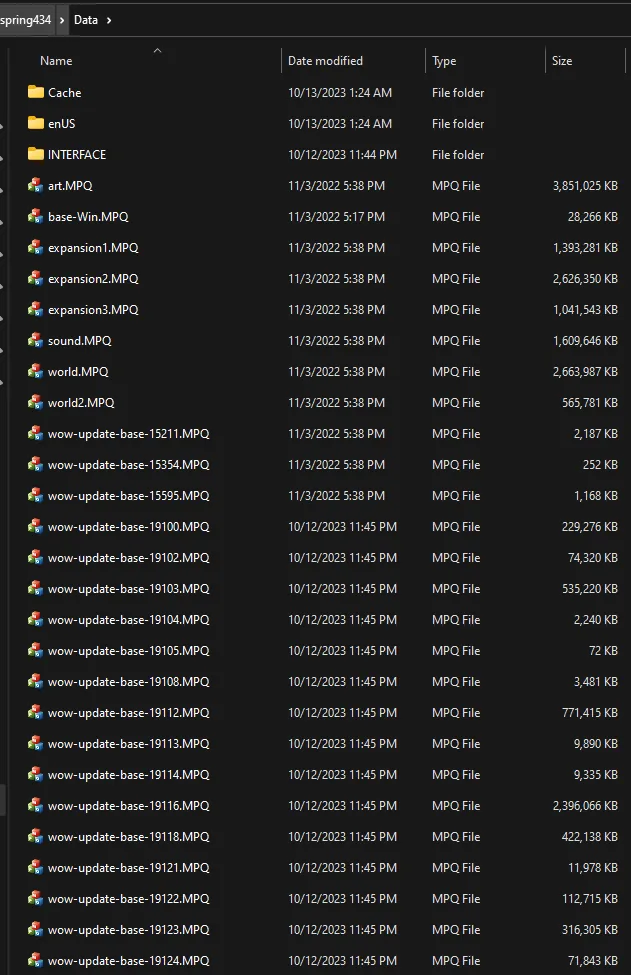
You only need these if you're patching a client yourself. Place every file in your Data folder.
Show all 13 patch files
- wow-update-base-19100.MPQ
- wow-update-base-19102.MPQ
- wow-update-base-19103.MPQ
- wow-update-base-19104.MPQ
- wow-update-base-19105.MPQ
- wow-update-base-19108.MPQ
- wow-update-base-19112.MPQ
- wow-update-base-19114.MPQ
- wow-update-base-19118.MPQ
- wow-update-base-19121.MPQ
- wow-update-base-19122.MPQ
- wow-update-base-19123.MPQ
- wow-update-base-19124.MPQ
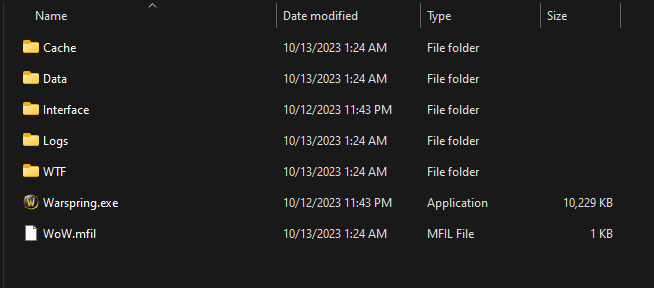
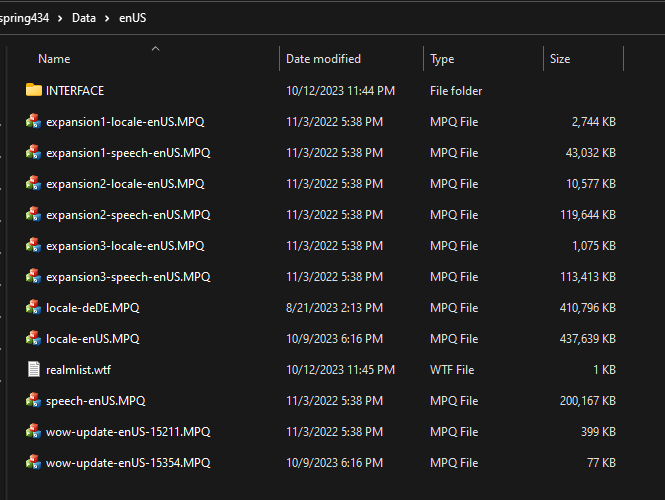
What a correctly patched client looks like
Compare your folders with these screenshots if something doesn't work.
Having trouble?
- Always start the game with Warspring.exe, not Wow.exe.
- Make sure there is no
set patchlistline in yourConfig.WTForrealmlist.wtf. - Being disconnected while logging in usually means your files don't match the server's. Compare your folders with the screenshots above.
- Still stuck? Read the FAQ or email us at [email protected].